Live CRM operations
Create, search, update, and delete leads, contacts, companies, and opportunities. Changes land in the same CRM your team uses in the YouEx app.
YouEx.ai exposes a secure MCP server that lets AI assistants work directly with your live CRM — leads, contacts, companies, opportunities, research, actions, and outbound email. In ChatGPT, you also get interactive widgets and visual report cards built for the App experience.
MCP server URL
https://engage.youex.ai/mcpUse this URL for Claude and other MCP-compatible assistants. For ChatGPT, install the app below.
What is MCP?
The Model Context Protocol (MCP) is an open standard that lets AI assistants call real tools against real systems. Instead of copying CRM data into a chat window, your assistant can list leads, update a contact, schedule a follow-up, or send an email — using structured tools with typed inputs and outputs.
YouEx.ai publishes an MCP server at https://engage.youex.ai/mcp with tools designed specifically for revenue workflows: prospecting, pipeline management, research, follow-up, and outbound.
How a CRM command flows
User prompt
Natural language in chat
AI assistant
ChatGPT, Claude, and more
YouEx MCP tools
33 revenue tools
YouEx CRM
Your live pipeline
Structured response
Results back in chat
Why YouEx MCP
Create, search, update, and delete leads, contacts, companies, and opportunities. Changes land in the same CRM your team uses in the YouEx app.
Beyond records: log CRM actions, schedule reminders, pull AI research reports, draft and send lead emails, and summarize pipeline health.
Every MCP call runs in your authenticated workspace. Your assistant only operates on the CRM data your account can access.
Typed tool schemas cover the hard parts — pagination, tag updates, email draft IDs, and record types — so your assistant executes CRM actions correctly on the first try.
Setup
Sign in with your YouEx.ai account when you connect. Your assistant works on your live CRM with the same permissions you have in the app.
The YouEx.ai ChatGPT App is available in OpenAI's Apps catalog — one-click install, then sign in with your YouEx account. You get the full MCP experience plus interactive widgets, report cards, and in-chat record editors.
Claude and other MCP clients use a simpler connector flow. Full instructions are in the MCP setup guide.
Tool catalog
Every tool is typed, documented, and scoped to your workspace. Ask in plain language — your assistant picks the right call.
create_leadCreate a lead with name, email, company, title, status, notes
list_leadsPaginated lead lists with timeframe filters (today, yesterday, 7d, 30d, recent, all), owner scope, search, status
find_leadsQuick search by name, email, or company
update_leadPatch lead fields; supports tagsMode (unchanged, replace, add, remove)
delete_leadDelete a lead by ID
delete_leads_by_emailsBulk delete by exact email match
Example prompts
create_contactCreate contact with email, phone, LinkedIn, company, title, status
list_contactsPaginated list with search, status, and company filter
find_contactsSearch by name, email, or company
update_contactUpdate fields and tags; supports Do Not Contact
delete_contactDelete by ID
Example prompts
create_companyCreate company with industry, website, type, status
list_companiesPaginated list with search and type filter
find_companiesSearch by name or industry
update_companyUpdate company profile and tags
delete_companyDelete by ID
Example prompts
create_opportunityCreate deal with amount, stage, probability, close date
list_opportunitiesPaginated list with search and stage filter
find_opportunitiesSearch by opportunity or company name
update_opportunityUpdate deal fields and tags
delete_opportunityDelete by ID
Example prompts
get_crm_summaryCounts across leads (New/VIP/Hot/Medium/Cold), contacts, companies, opportunities, pipeline value
get_crm_research_reportFull stored research report + sources for a lead, contact, or company
refresh_crm_research_reportQueue or restart research for a record
Example prompts
list_crm_actionsList logged/scheduled actions for any CRM object
create_crm_actionLog a completed action or schedule a future one with optional reminder
Example prompts
create_lead_email_draftSave subject/body draft without sending
list_lead_email_draftsView drafts and send status for a lead
get_lead_email_draftFetch one draft by draftId
send_lead_email_draftSend saved draft to the lead
Example prompts
ChatGPT App
Live nowInstall the YouEx.ai app from ChatGPT's Apps catalog for interactive HTML widgets, output templates, and structured content that render natively in chat — not just JSON in a message bubble.
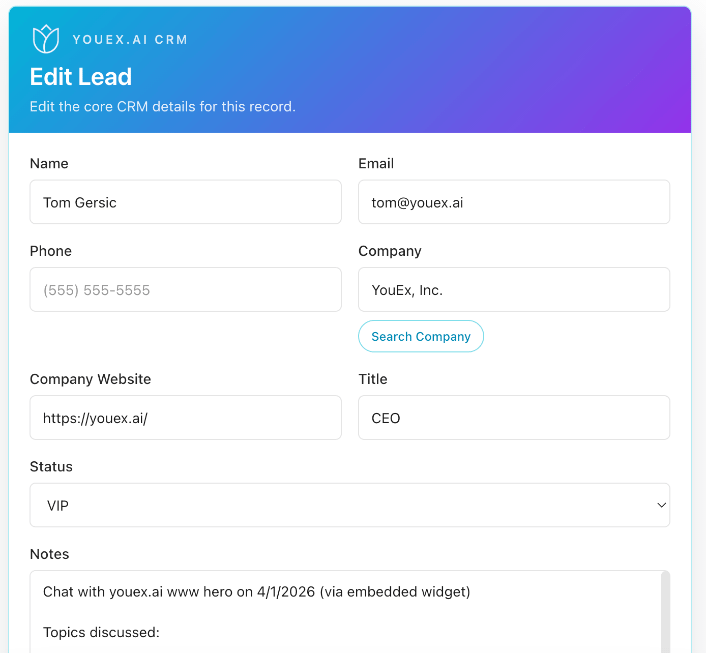
Install YouEx.ai in ChatGPTopen_crm_record_editorOpens a full CRM create/edit experience inside ChatGPT for leads, contacts, companies, and opportunities — with prefilled fields, lookup helpers, and saves through the same MCP tools.
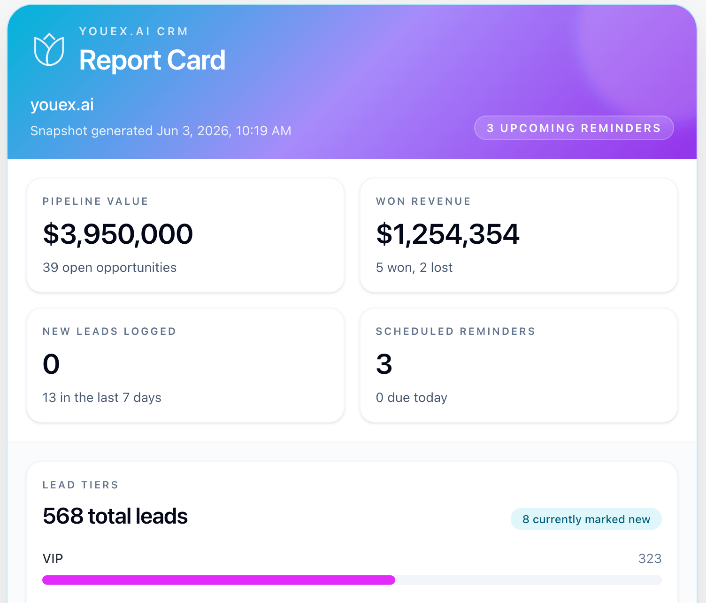
open_crm_report_cardA visual dashboard in chat showing lead health tiers, pipeline value, won revenue, new leads logged, and upcoming reminders with due dates.
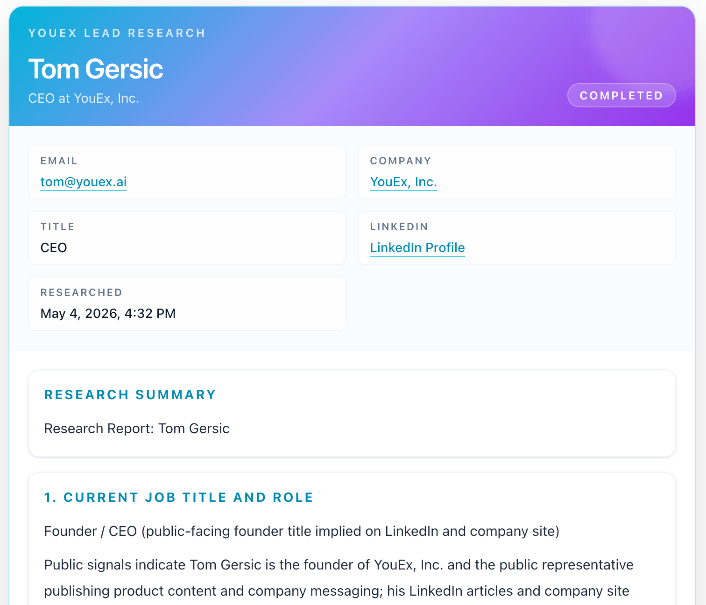
open_lead_research_cardA formatted research briefing with lead profile, research status, full report content, and source links — readable at a glance, not raw JSON.
Workflows
“Open my CRM report card, then list hot leads assigned to me.”
“Log a meeting with Acme's VP Sales, create a scheduled email reminder for Friday, and draft the follow-up.”
“Create a lead from this LinkedIn profile, refresh research, then open the research card.”
“Find the Acme opportunity, update stage to Negotiation, and log a call note.”
“Find duplicate leads with this email and delete them.”
Security & trust
YouEx MCP is built for real revenue operations, not demos. Assistants operate on the same records, research, actions, and email drafts your team sees in YouEx.ai.
Who this is for
Update CRM while mobile, draft follow-ups, and review research without opening another tab.
Standardize how reps log actions, tag records, and keep pipeline data current through AI workflows.
Turn ChatGPT into a CRM co-pilot with visual widgets instead of copy-paste busywork.
Widget / visual tools
open_crm_record_editoropen_crm_report_cardopen_lead_research_cardLeads
create_leadlist_leadsfind_leadsupdate_leaddelete_leaddelete_leads_by_emailsContacts
create_contactlist_contactsfind_contactsupdate_contactdelete_contactCompanies
create_companylist_companiesfind_companiesupdate_companydelete_companyOpportunities
create_opportunitylist_opportunitiesfind_opportunitiesupdate_opportunitydelete_opportunityResearch
get_crm_research_reportrefresh_crm_research_reportActions
list_crm_actionscreate_crm_actioncreate_lead_email_draftlist_lead_email_draftsget_lead_email_draftsend_lead_email_draftSummary
get_crm_summaryYour pipeline is already in motion. YouEx MCP lets your AI assistant keep up — and in ChatGPT, it can show you the work as it happens.