September 16, 2026
Your Website Is Open. Your Chatbot Is a Waiting Room.
Someone is on your website right now, trying to decide whether to buy from you. Maybe they followed a recommendation. Maybe they clicked an ad you paid for. Maybe your months of AEO/GEO efforts paid off and ChatGPT or Claude told them to check you out. Maybe they spent twenty minutes comparing options and yours made the shortlist.

Maybe they have a question. Something standing between “this looks interesting” and taking the next step.
There’s a chat bubble in the corner. It looks like help, so they open it. Nobody’s there.
Instead, they get a request for their email address, a promise that somebody will get back to them, or an explanation that the team is away. In one particularly extraordinary version of the waiting room experience, they get offered a game to play.
Your website is available twenty-four hours a day. The thing you installed to help people buy from it has office hours. And somehow, we’ve accepted that as normal.
I wait, I wait, I wait, I wait
We collected examples on the YouEx.ai Web Agent page. These are all 100% real. Honestly, it’s not even all that hard to find a bad chat experience. Most are pretty bad. That said, I’ve redacted the names of the companies that are using these chatbots in the images shown here, but I have left the chat vendor names in if it shows it.
Looking at them together, what stands out is how consistently different products deliver the same experience: the appearance of a conversation, followed by a reason the conversation cannot happen.
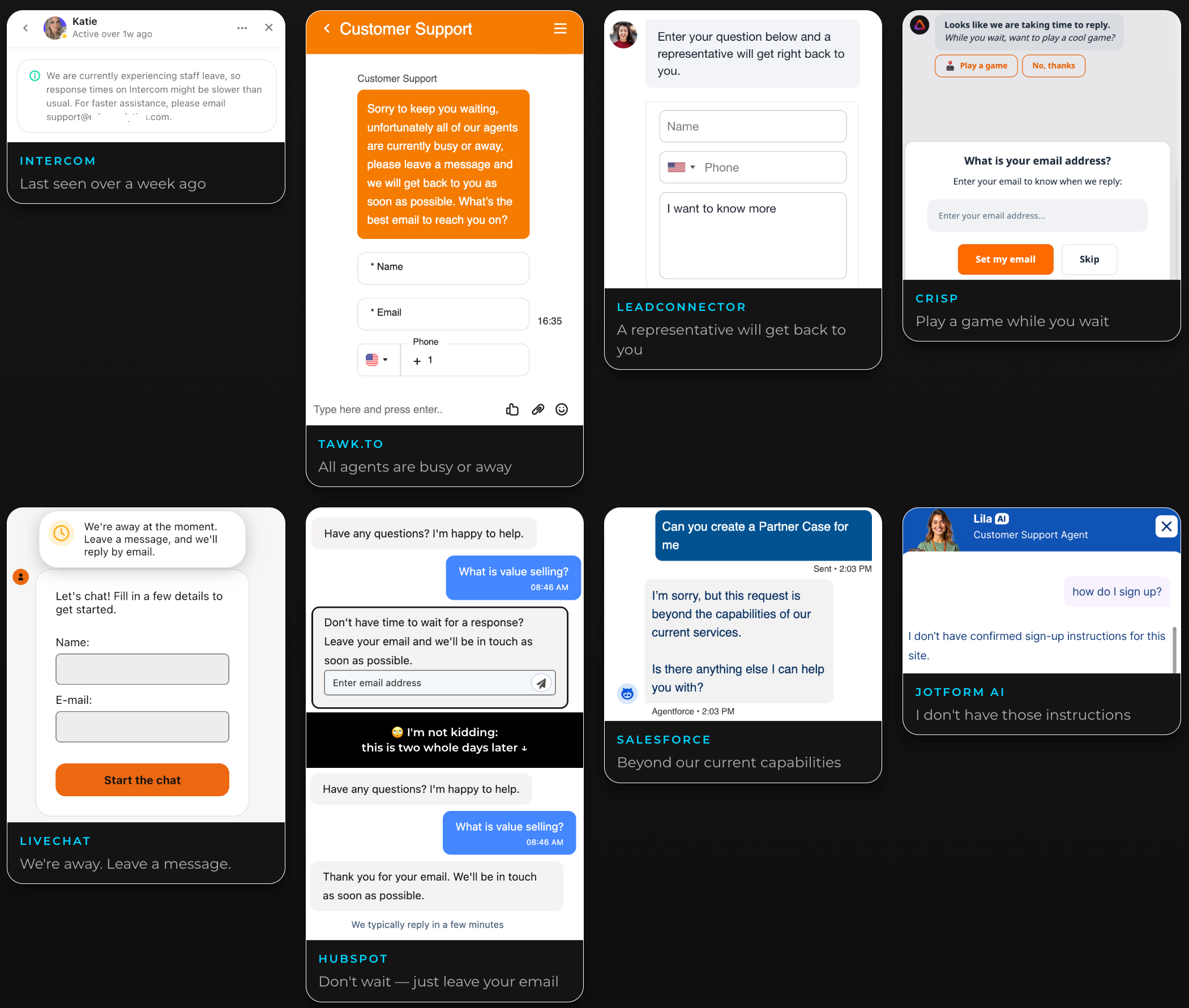
Start with the Intercom example. There’s a person’s face, a name, and a status indicating they were active over a week ago. A notice explains that staff leave is slowing responses and directs the visitor to email instead.
People should take leave for sure. The issue is building the website’s invitation to talk around a person who isn’t there, then leaving that invitation running. The visitor opens a conversation and discovers an unattended desk.
The Tawk.to example reaches the same destination more directly. All the agents are busy or away. Leave a message. Supply your name, email, and phone number.
Notice how much work the visitor has already been given before receiving any help. They arrived with a question about the business. The business responded with questions about them.
LeadConnector pares the experience down to a promise that a representative will get back to you, alongside fields for your name, phone number, and message. That may collect an inquiry. But the conversation still hasn’t started. Everything useful has been deferred to an unspecified person at an unspecified time.
LiveChat makes the contradiction especially visible. One message says the team is away and will reply by email. Underneath it, the widget invites you to fill in your details and start chatting. Start chatting with whom?
From the visitor’s perspective, the support team these interfaces keep pointing toward doesn’t exist in that moment. There may be employees somewhere. There may be an inbox somebody checks tomorrow. There may even be a perfectly reasonable staffing plan.
None of that answers the question on the screen tonight. The website is open. The conversation is closed. The user experience is horrible.
Why is Customer Support Selling Stuff?
This matters because the person opening that widget may not need customer support at all. They may not be a customer yet.
I mean, if I were a customer needing support, I probably wouldn’t go to your homepage. They’re evaluating the product. They want to understand whether it does something, how it fits their situation, or what they should do next. Those are sales conversations. Yet we keep handing them interfaces organized around support queues, agent availability, and callbacks.
The HubSpot example makes that mismatch painfully clear. The widget has offered to help, but instead of answering, it asks for an email address so someone can respond later. The follow-up screenshot, marked as two days later, still shows the acknowledgment and a message saying replies typically arrive within a few minutes.
There’s something almost perfect about a conversation about value selling in which no value has been delivered. The system has successfully collected an email address. If that’s the metric, perhaps something worked. But the buyer’s question is still sitting there.
Collecting someone’s contact information and helping them make a buying decision are different accomplishments. It’s possible to do the first while failing completely at the second.
Imagine walking into a shop and asking whether a product will work for your situation. The person at the counter asks for your phone number and says somebody might call you about it.
You haven’t been helped. You’ve been assigned a follow-up process. Online, leaving is even easier. There’s another tab.
Want to play a game?
Then there’s Crisp. The visitor is told that a reply is taking time and offered a game while they wait. The widget also asks for an email address so the team can respond later. And yes, there really is a game. Crispy Bird. It’s pretty fun, but why would anyone want to play a game on a support bot?
I came here because I’m trying to accomplish something. I have a question about your business. I might be trying to give you money. Somewhere between expressing that interest and getting an answer, I’ve been invited to play with a bird.
The absurdity is revealing. The waiting has become so accepted that it has its own entertainment feature.
Think about the assumption underneath that decision: the visitor will remain here, inside this little box, occupying themselves until the company becomes available.
But a prospective buyer has no obligation to sit in your waiting room. They can keep researching. They can ask somebody else. They can abandon the task altogether. And they will.
AI to the rescue?
You might expect AI to change that. Finally, something can respond when a human isn’t available. But a response is only useful if it moves the visitor forward.
In the Salesforce Agentforce example, the visitor asks to create a Partner Case. The agent says the request is beyond its current capabilities, then asks whether there’s anything else it can help with.
That is a support request, and it exposes the same dead end: the interface invites a task it cannot complete, then puts the burden back on the visitor to discover something it can do.
The Jotform AI example brings the problem directly back to sales.
The visitor asks how to sign up. The agent says it doesn’t have confirmed sign-up instructions for the site.
That’s about as close to a buying signal as a visitor can get. They’re asking for the entrance, and the agent standing at the entrance doesn’t know where it is.
These screenshots show particular deployments and interactions. They also show why putting “AI” on a widget doesn’t, by itself, solve the underlying problem. An agent can be available all night and still leave the buyer stranded.
Purpose built to be better
Across these examples, the visitor keeps reaching the same point: I still can’t do what I came here to do. Then, at the moment that person expresses interest, the website hands them a waiting ticket.
That’s the problem we’re building YouEx.ai’s Web Agent to address. The agent should know the business’s content, answer useful questions, understand what the visitor needs, and help them take an appropriate next step. When a human conversation is needed, it should carry forward the context and make that conversation easier to arrange.
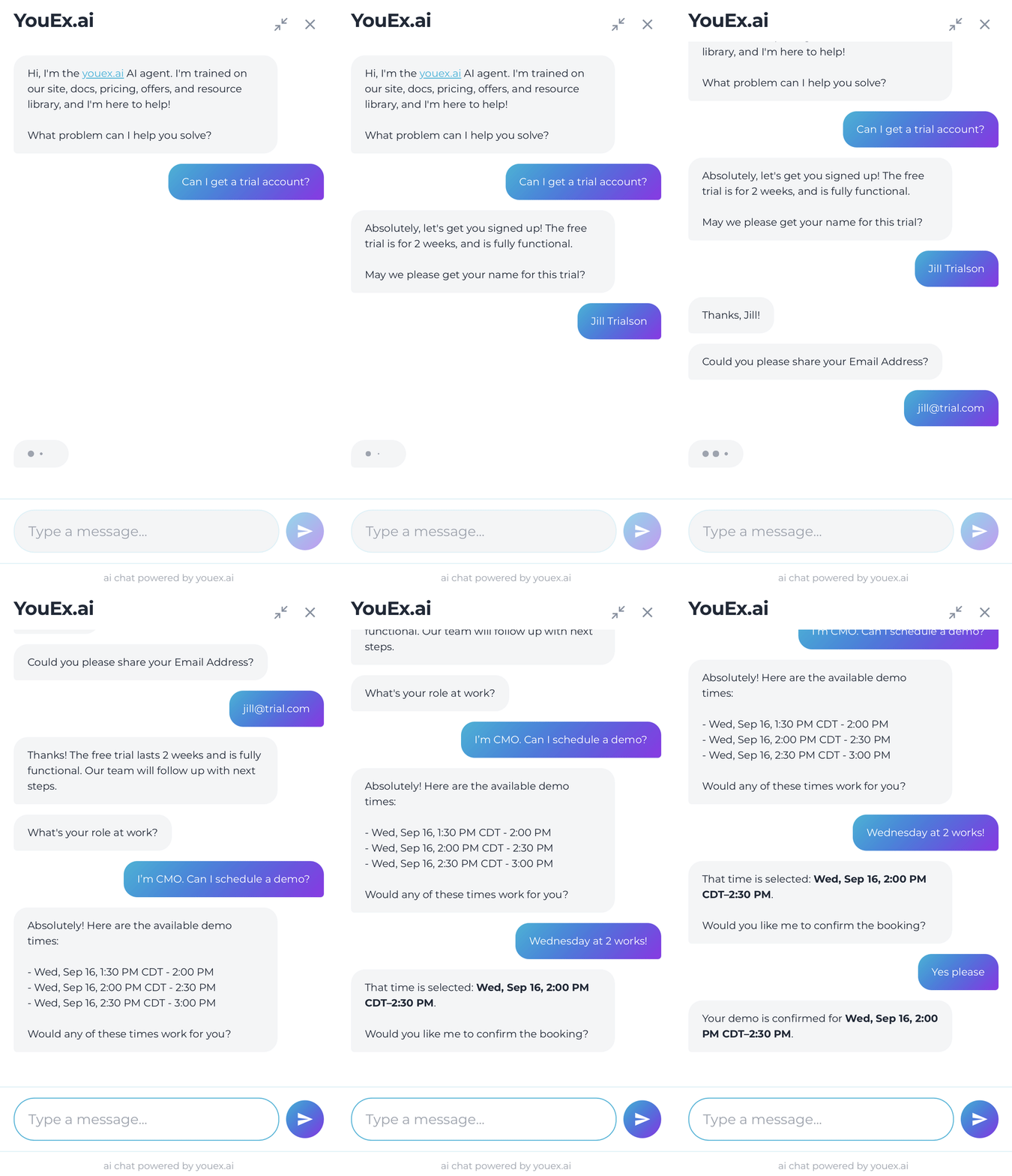
The visitor should leave the interaction further along than they entered it.
That sounds like a modest expectation. It is.
Your prospective customer has already shown up. They’ve already asked a question. For a brief moment, learning about your business is something they actively want to do.