← Back to home
FeatureAutomated Research

Show up knowing the buyer

YouEx.ai researches leads, contacts, and companies in the background — then leaves a ready-to-use brief with an executive summary and sources on the record.

From capture to context

1

Capture

Lead enters CRM

2

Research

Pipeline runs in background

3

Brief

Summary + sources ready

4

Act

Outreach with context

Why it matters

Generic outreach fails because reps open a lead with a name and an email — and nothing else. Research tabs get skipped. Tabs multiply. The first call still starts cold.

Automated Research closes that gap: capture → background research → brief on the record. Your team keeps selling while the pipeline builds context.

What you get

A brief you can sell from

Every completed run leaves the same shape of output on the record — so reps know where to look.

  • Full research report with sectioned findings
  • Executive summary for a 30-second scan
  • Source links back to the evidence
  • Completion timestamp and status you can refresh
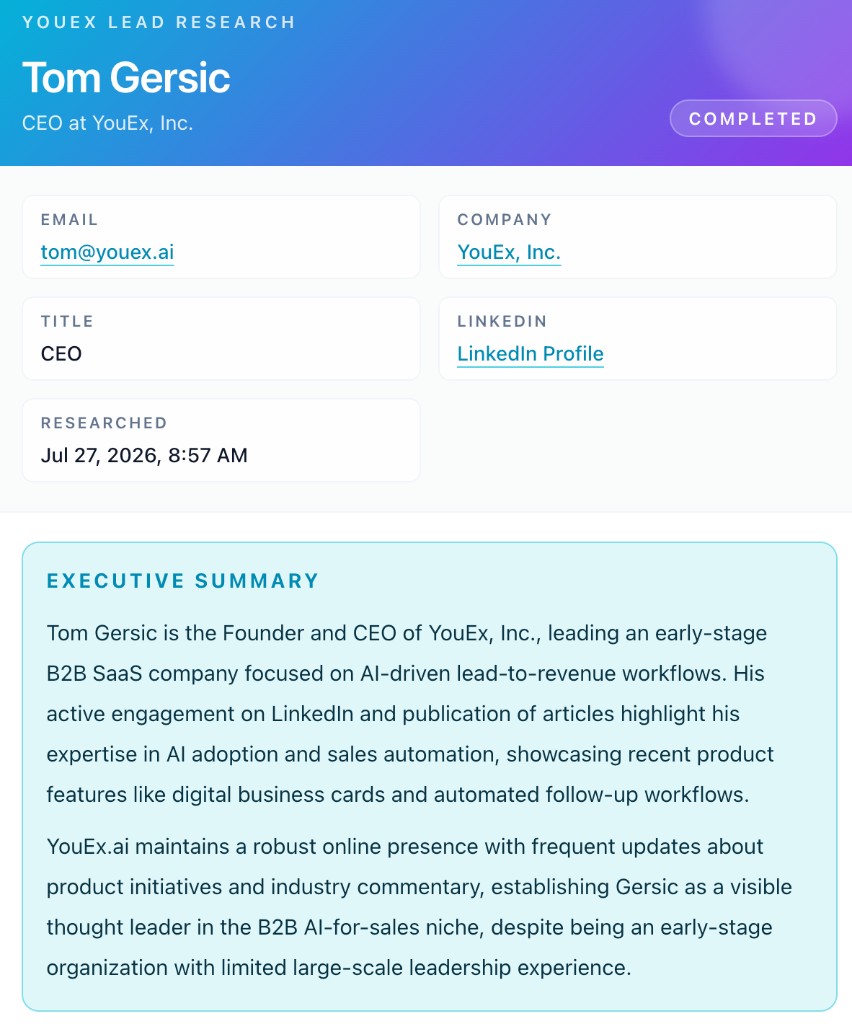
YouEx.ai lead research report showing profile details and executive summary

Across the CRM

Same engine. Right-sized to the record.

Leads

Inbound and captured prospects get a full brief — role, company context, sources, and an executive summary — ready before the first follow-up.

Contacts

Same research engine on CRM contacts. Status, summary, sectioned report, sources, and refresh — so existing relationships get the same depth as new leads.

Companies

Account-level research in two phases: fundamentals (who they are) and sales intelligence (signals that matter for timing and positioning).

How it works

From request to ready brief

1

Step 1

Research starts in the background

When research is requested — automatically or on demand — the lead is marked pending and a job runs asynchronously so your team can keep working. Failures retry with backoff instead of disappearing.

2

Step 2

The pipeline gathers context

Ordered steps pull what matters: optional connected-mailbox signals, the employer website, web search, and target sites you configure (LinkedIn, YouTube, X, Medium, Substack by default).

3

Step 3

Everything lands in one brief

Results merge into a full research report, executive summary, source list, and completion timestamp — open the record and you’re ready to sell.

Workspace controls

Tune the pipeline to your process

Admins configure research per workspace — so depth and sources match how your team sells.

Employer website

Turn the company-site crawl on or off, and tune timeout and page limits.

Web search

Enable or disable Google search as part of the research run.

Target sites

Choose which domains to prioritize — or stick with the defaults.

Mailbox context

When Gmail or Outlook read is allowed, research can include connected-mailbox signals — and skips providers that aren’t enabled.

Company research

Account context in two phases

Company research resolves the right entity first and evaluates source quality — and can return insufficient evidence instead of hallucinating when confidence is too low.

Fundamentals

Industry, HQ, size, funding stage, products, ICP, business model, and key geographies — with entity resolution so lookalike companies don’t pollute the brief.

Sales intelligence

Hiring signals, tech stack, funding events, leadership changes, launches, competitors, market position, and recent news — timed for real outreach.

Enrichment

Expand reach without clobbering CRM truth

Starts when there’s enough signal

Enrichment runs when a LinkedIn URL is present, or when name plus company (or business email domain) is available. Personal inboxes like Gmail aren’t used for domain matching.

Never clobbers trusted CRM data

Existing primary fields stay put. New emails and phones fill gaps or land in additive fields. Social and profile metadata expand the record without overwriting what your team already validated.

Account expansion

From one lead to a buying committee

1

Search contacts at the account

Enter a job title, optionally exact-match, set a result limit, and find people at the company — with credit estimates before you confirm.

2

Create and queue research

Select people, create contacts, and optionally queue enrichment. Research and enrichment can run in the background for the whole batch.

3

Map the buying committee

Relationship maps show contacts, reporting lines, and deal-role labels — champion, blocker, influencer — so enterprise deals move past the single-threaded lead.

In practice

How teams use it

Inbound to first-touch

A web lead arrives, research completes in the background, and the rep opens a ready brief with sources — then sends outreach grounded in real buyer context.

Account expansion

Run company research, search for VP IT and Procurement, create contacts with research queued, then use the buying committee map to cover the deal.

Cleaner data, same truth

Enrichment adds alternate emails and phones without replacing a validated corporate address your team already trusts.

At a glance

Context before the first touch

  • Background pipeline — keep working while research runs; retries instead of silent drops
  • Configurable steps — employer site, web search, target domains, optional mailbox context
  • One brief per record — report, executive summary, sources, and timestamp
  • Leads, contacts, and companies — same depth, right-sized to the record type
  • Conservative enrichment — fill gaps and add fields; don’t overwrite good CRM data
  • Account workflows — find contacts by title, queue research, map the buying committee

FAQ

Common questions

Does research run automatically?

Research can start automatically when leads enter the workflow, or on demand from the record. Either way it runs in the background and returns a brief when complete.

Can I control what sources are used?

Yes. Workspace admins can enable or disable employer website crawl, web search, and target-site steps — including which domains to prioritize.

Will enrichment overwrite emails we already have?

No. Enrichment is conservative: it fills missing fields and stores extras in additive custom fields so validated CRM data stays intact.

What if there isn’t enough evidence on a company?

Company research resolves the entity first and evaluates source quality. When confidence is too low, it can return insufficient evidence instead of inventing a profile.

Every lead deserves a brief, not a blank page.

Automate research across leads, contacts, and companies — then enrich safely and expand into the buying committee when the deal needs it.