November 12, 2026
Should You Build Your Own CRM With AI?
It’s never been easier to build your own CRM. With Claude, ChatGPT or Lovable, a capable person can have contacts, companies, deals and a pipeline board working in a weekend. For a team frustrated by an expensive, bloated CRM from one of the big incumbent players, that’s a tempting idea. Also, on the surface, CRM looks pretty simple: it’s just a usability layer on top of a relational data model, right?
I’ve talked with people who’ve done it: engineers who built their own CRMs, admins who’ve run Salesforce, Hubspot and Zoho accounts, and founders who tried it and went back. Their verdict was surprisingly consistent. Building the first version is the easy part. Running it is the job that never ends, and every hour spent maintaining software that isn’t part of what you sell is an hour not spent on what you do sell.
Here’s an honest look at both sides, and at the middle path most teams should take.
What are the pros of building your own CRM with AI?
The pros are real:
It fits your process exactly. Your stages, your fields, your words, and nothing you don’t use.
No per-seat pricing. Adding a user doesn’t add a line to the invoice. I’ve seen many Salesforce implementations that had limited adoption only because it cost too much to roll it out to everyone who needed it.
You own the data and the data model. No vendor decides what a deal or an account is.
AI makes the first version fast. What took months now takes weeks, or less.
And for some teams, it works. A single owner managing a few thousand records can run a simple homegrown CRM, built on a spreadsheet, Airtable, or a no-code tool and connected to an AI assistant, and be perfectly happy. When the team is small, the data is simple and one person owns it, a homegrown CRM can be enough.
What are the cons of building your own CRM?
The problems start after launch, and they keep coming.
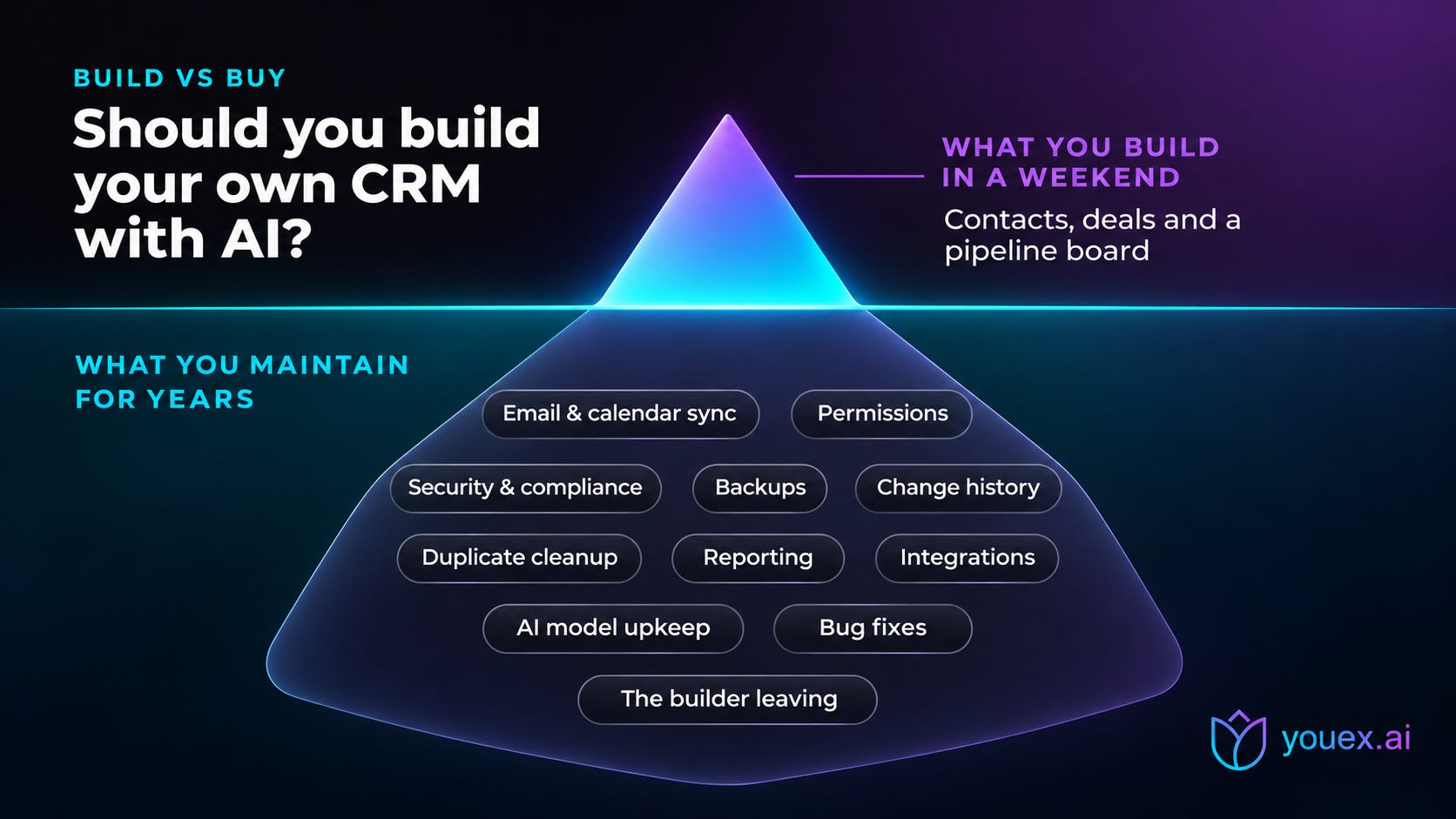
You become a software company. Someone has to fix bugs, ship changes, deploy updates and answer “why is this broken?” on a Monday morning. If you don’t sell software, you’re now managing developers anyway, often without knowing how.
Integrations break. Almost every team needs email and calendar sync, and it’s the feature most likely to fail. Providers change their APIs, tokens expire, and missed or duplicated activity piles up quietly.
Permissions are harder than they look. It’s common to discover weeks after launch that the wrong people can see the wrong things, like everyone’s commission or a deal they shouldn’t know about. Who can see what is a core CRM feature, not an extra.
Security and compliance become your problem. A CRM holds your customers’ personal data. Depending on who you sell to, that means GDPR, SOC 2, ISO or HIPAA questions. A breach doesn’t just leak your notes. It leaks your customers’ information.
AI-built code is hard to maintain. Code written by an AI often has no documentation explaining how or why it works. When something breaks and you keep asking the AI to fix its own code, it tends to get messier, not better. And an AI agent that writes to the wrong field in your live data is a real risk.
The builder becomes the bottleneck. The person who built it is usually the only person who understands it. When they leave, the knowledge leaves with them.
The feature list never ends. CRMs, project management tools and company chat are the classic in-house software traps. They seem simple, and everyone in the company has one more feature they want.
What does a CRM actually need to do?
A pipeline board and a contact list are the visible part. Here’s what a production CRM also has to handle:
Relationships between records, so a contact, company and deal stay connected
One source of truth, without copies of the same information scattered across records
Call logs, text messages and meetings
Comments and attachments
Change history, and a way to recover from mistakes
Permissions: who can see and edit what
Search that works across every record type
Reporting that’s flexible without being confusing
Quoting, with margins, tax and approvals
Then add AI on top: research, scoring and drafting, each with model costs that grow with your usage, and behavior that changes every time the models change.
Oh, and don’t forget about integrations! Want it to work with ChatGPT and Claude? OK, now you’re writing an MCP server. Then add email, calendar and meeting transcription.
When does building your own CRM make sense?
Here’s a simple test: write down the specific workflows your team needs that an off-the-shelf CRM can’t handle. If you can’t name any, your problem probably isn’t software. It’s process or adoption, and a new tool you built yourself won’t fix either.
Build if most of these are true:
You can name specific workflows no product can handle, even with customization.
You have a development team who will own it for years, not just build the first version.
The CRM itself is part of what makes your business different.
You’re prepared to handle security, compliance, backups and support.
Don’t build just to save money. Once you count everyone’s time, saving on subscriptions is rarely the win it looks like.
If you’re not sure, use AI to build a rough prototype first. It’s a cheap way to pin down exactly what you need, before you commit to owning it.
What’s the middle path between building a CRM and buying one?
There’s a better option than choosing between building everything and settling for a bloated suite: build your own interface and workflows, but keep a trusted, maintained CRM underneath as the system of record. You get the custom experience you want, and someone else handles security, infrastructure, integrations and maintenance.
That’s exactly how YouEx.ai is designed to be used. We work where you already work: ChatGPT, Claude, Salesforce, Gmail and Outlook.
What do you get out of the box with YouEx.ai?
YouEx.ai is an AI-native CRM built for founder-led teams, with everything a homegrown CRM would need to build, already built and maintained for you:
A real CRM. Leads, contacts, companies and opportunities, with stages, a kanban board view, deal summaries, and lead-to-opportunity conversion in one click.
Research on every lead. Every new lead gets a research report with sources and an executive summary. YouEx.ai is not a data entry tool for sales reps. It’s a data provider for them.
Lead scoring you can read. VIP, Hot, Warm and Cold playbooks written in plain English, with a written reason on every score.
Web agents. AI agents on your website that answer buyers with your own content, capture leads and book meetings at any hour.
Email drafting with human approval. Follow-ups drafted in your voice, and nothing sends until a person approves it.
Prospecting. ICP company and contact search, plus Buying Committee search.
Email and calendar connections. Google, Outlook and Calendly, plus Slack.
MCP for ChatGPT Plugins and Claude. Work your pipeline from the AI assistant you already use: create leads, pull research and update deals by asking.
A REST API and Zapier. Build your own interface, workflows and automations on top of YouEx.ai. This is the middle path: your experience, our foundation.
Salesforce App. If you’re already on Salesforce, YouEx.ai can work alongside it.
You keep the flexibility you wanted from building your own, through the API and MCP, and skip becoming a software company.
The short version
AI makes it easy to build a CRM. It doesn’t make it easy to run one.
The hidden costs are integrations, permissions, security, maintenance and the builder leaving.
Build only if you can name workflows no product can handle and have someone to own it for years.
Don’t build just to save money.
For most teams, the best option is the middle path: a maintained CRM with an API and MCP, and your own workflows on top.
Frequently asked questions
Can AI build a CRM?
Yes. AI tools can build a working first version quickly. Running it in production is the hard part: email and calendar sync, permissions, backups, security, reporting, and an owner who maintains it over time.
Is it cheaper to build your own CRM?
Usually not, once you count everything. Hosting, AI usage, data providers, security work and, most of all, people’s time tend to cost more than a subscription for a small or mid-sized team. But choose carefully: you may not need the biggest, most expensive CRM, either.
What’s the hardest part of maintaining a homegrown CRM?
Integrations and permissions. Email and calendar sync breaks as providers change their APIs, and getting “who can see what” right is easy to get wrong and hard to fix later.
Is a vibe-coded CRM secure?
It can be, but only if someone with security experience reviews and maintains it. A CRM holds customers’ personal data, so access control, authentication, backups and compliance need real attention, not just working screens.
Should I build on an open source CRM instead?
If you have developers, an open source base is safer than starting from scratch, because the core is already built. You still own hosting, updates, security and support.
Can I customize YouEx.ai instead of building my own CRM?
Yes. YouEx.ai includes a REST API, an MCP server for ChatGPT and Claude, and Zapier, so you can build your own interface and workflows on top of a maintained CRM.
Does YouEx.ai work with ChatGPT and Claude?
Yes. Install the YouEx.ai he ChatGPT plugin and Claude MCP connector, and you can create, read and update your CRM records by asking.
Thinking about building your own? Try YouEx.ai first. Start a 15-day free trial, or see the plans at youex.ai/pricing.